Now Playing
Whatever your Mac is playing — Music, Spotify, the Apple TV app, YouTube — with artwork and controls. Choose Compact, Artwork first, One line, or a turntable whose record spins and whose tone arm follows along.
A quiet glass panel for your Mac’s vital signs.
What’s playing, the weather, how hard your Mac is working, your network and your drives — one glance at the edge of your screen, then it slips away.
macOS 27 or later · Apple silicon · Notarised by Apple · Updates itself
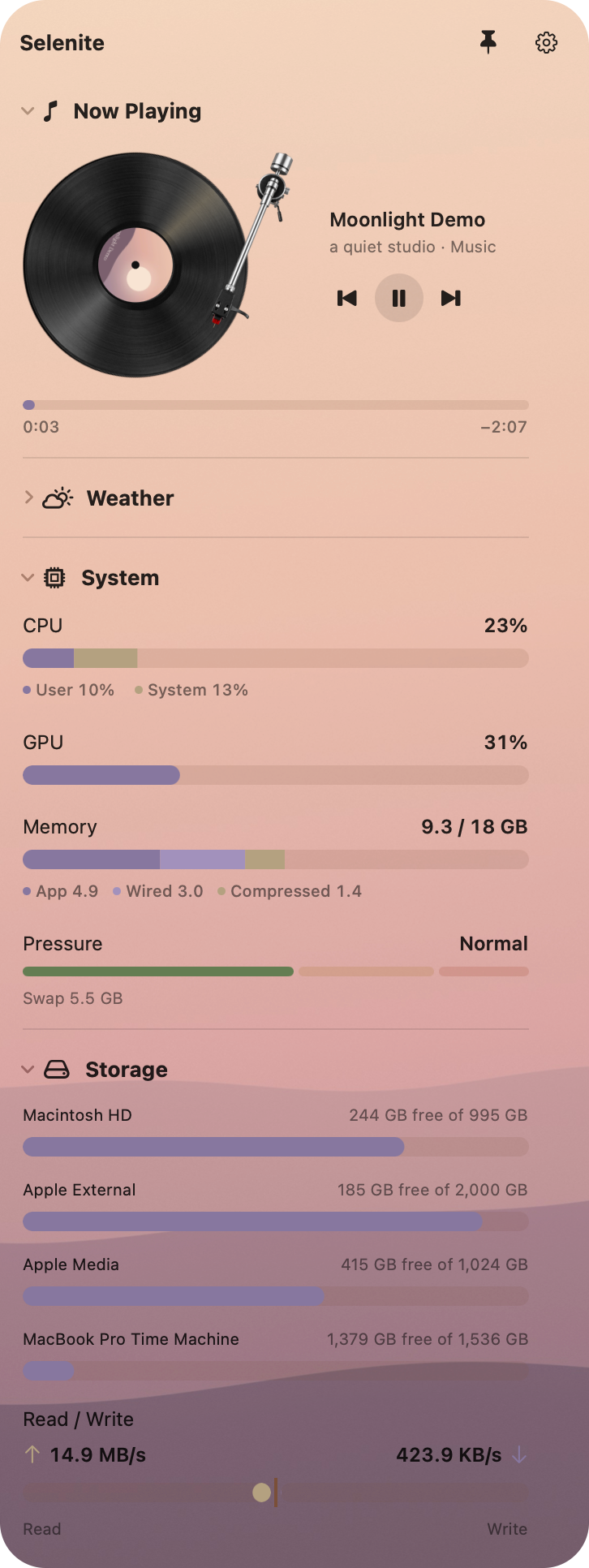
Five sections you can reorder, collapse or hide. Each has its own styles in Settings.
Whatever your Mac is playing — Music, Spotify, the Apple TV app, YouTube — with artwork and controls. Choose Compact, Artwork first, One line, or a turntable whose record spins and whose tone arm follows along.
Now, the next hours and the next five days for where you are. Forecasts from Open-Meteo.
CPU, GPU, memory and memory pressure as calm horizontal bars. Optionally, the five apps using the most memory.
Live download and upload on one bar that splits from the centre, with your connection and addresses.
Free space on every drive, including your Time Machine disks, plus live read and write speed.
A tall column at the left edge, or a full-width strip under the menu bar for short, wide screens. Chosen for each display.
Pause the pointer in the top-left corner, press Control-Option-S, or click its menu bar icon. Pin it to keep it open.
Pause a song or skip a track while you keep typing in your own app.
Two glass surfaces and seven soft colour sets for the bars, in light or dark.
It reads only what’s on screen, and stops reading when you close it or collapse a section.
$9.99, once · free updates for Selenite 1 · try it free for 14 days
macOS 27 or later · Apple silicon